

My Worksheet Maker includes a formula editor so you can add fractions, exponents, square roots, and other math notation to any text field on your worksheet. You write your formula in LaTeX, a standard syntax for typesetting math, and the editor renders it on the worksheet.
1. Add the question type you need.
Choose Open Response, Multiple Choice, or any other question type, and click into the field where the formula should go (the question prompt, an answer choice, and so on).
2. Expand the toolbar.
The formatting toolbar sits in the top left of the editor. Click the double arrow (») at the end of it to show the full set of tools.

3. Click the function button.
With the toolbar expanded, click the Fx to open the Enter Formula box.
4. Type your formula in LaTeX.
The box shows e=mc^2 as an example of the expected syntax. Enter your own formula in its place.
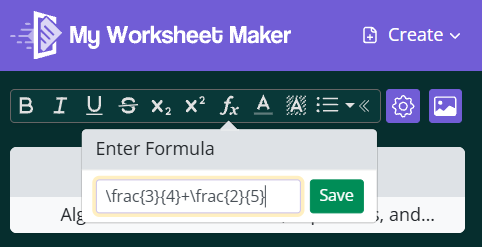
5. Click Save.
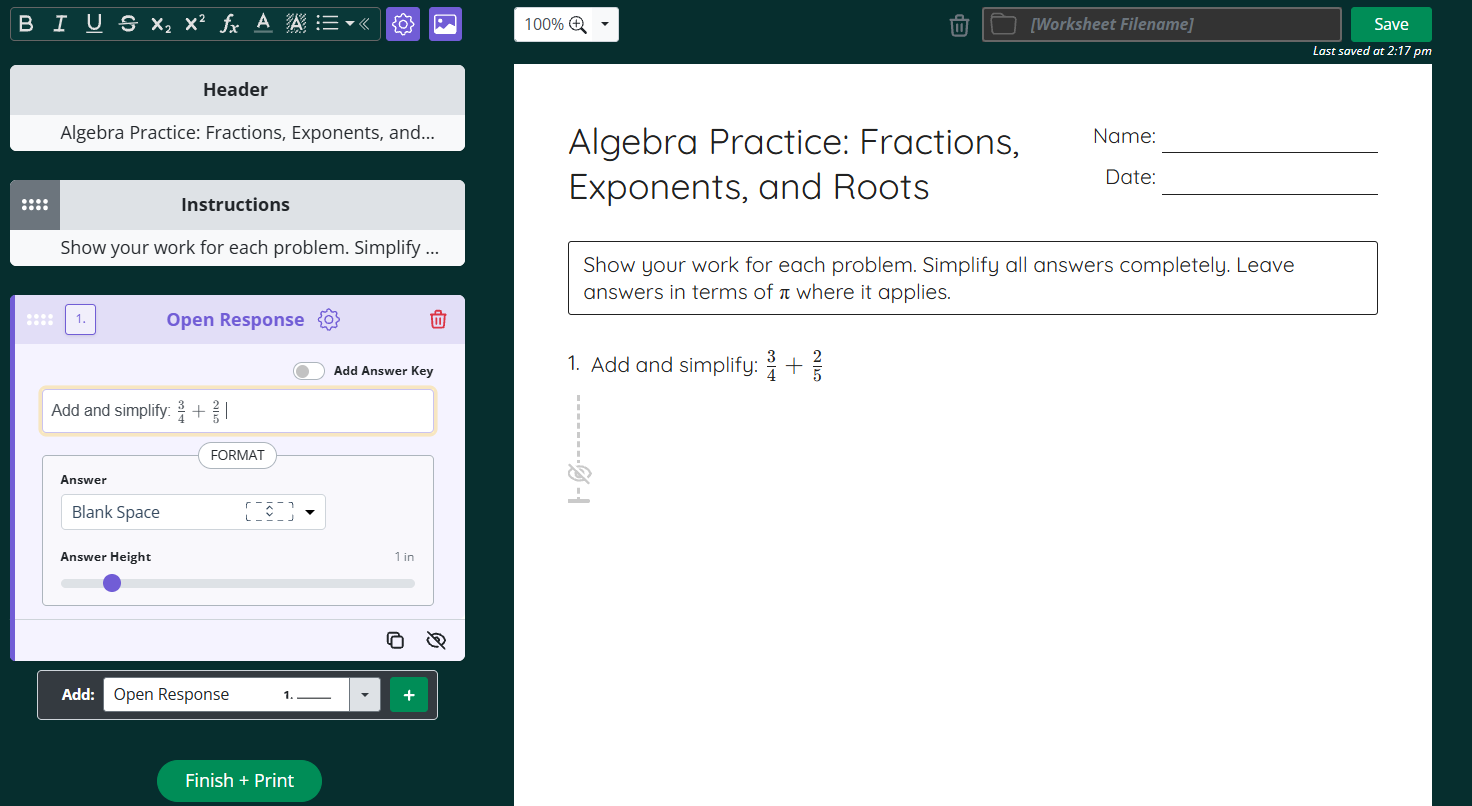
Your formula appears both in the question block on the left and in the worksheet preview on the right, so you can check that it rendered the way you intended before printing.
New to LaTeX? Start here
LaTeX is a way of writing math with plain keyboard characters. You type a command, and the editor renders it as properly formatted notation. A handful of commands covers most worksheet math:
What You Want: | What you type: | Result: |
Fraction | \frac{3}{4} | ¾ as a stacked fraction |
Mixed number | 2\frac{1}{2} | 2½ |
Exponent | x^2 | x² |
Subscript |
| a₁ |
Square root | \sqrt{16} | √16 |
Cube root | \sqrt[3]{27} | ∛27 |
Multiplication | \times | × |
Division | \div | ÷ |
Plus or minus | \pm | ± |
Less/greater than or equal |
| ≤ ≥ |
Not equal | \neq | ≠ |
Pi | \pi | π |
Degrees | 45^\circ | 45° |
Two rules cover most mistakes:
Anything longer than one character needs curly braces.
x^10renders as x¹0, whilex^{10}renders as x¹⁰. Long superscripts and subscripts have to be collected in braces, because LaTeX normally applies^and_only to the character immediately following. Reference: https://www.overleaf.com/learn/latex/Subscripts_and_superscriptsFractions always take two sets of braces, in the form
\frac{numerator}{denominator}. You can nest them:\frac{1+\frac{1}{x}}{3x+2}. Reference: https://www.overleaf.com/learn/latex/Fractions_and_Binomials
For a fuller list of commands and symbols, Overleaf's guide to mathematical expressions is a good reference: https://www.overleaf.com/learn/latex/Mathematical_expressions
Tips
Check the preview on the right before printing. If a formula renders as raw text, look for a missing brace or a mistyped command name.
Build complex formulas in pieces. Add the outer structure first, then fill in the numerator and denominator.
Need help? Reach out to us at support@brightsprout.com and a member of our support team will get back to you within 24 hours.